Google AI Mode is a search upgrade that places an AI-written summary answer at the top of your results, drawing from many web pages at once. It's great for quick everyday questions, but it can be wrong about facts, prices, and recent news — check the linked sources for anything that matters.
Google Search now does something it never did before: it writes you an answer. Instead of just showing a list of links, it reads dozens of those pages and tries to summarize what they say in plain language. That's Google AI Mode in a nutshell.
This is a big shift. Here's what you need to know to use it well — and when to trust it.
What Google AI Mode actually does
When you type a question into Google today, you may see a shaded box at the top of the page before the regular blue links. That box contains an AI-generated answer written specifically for your question.
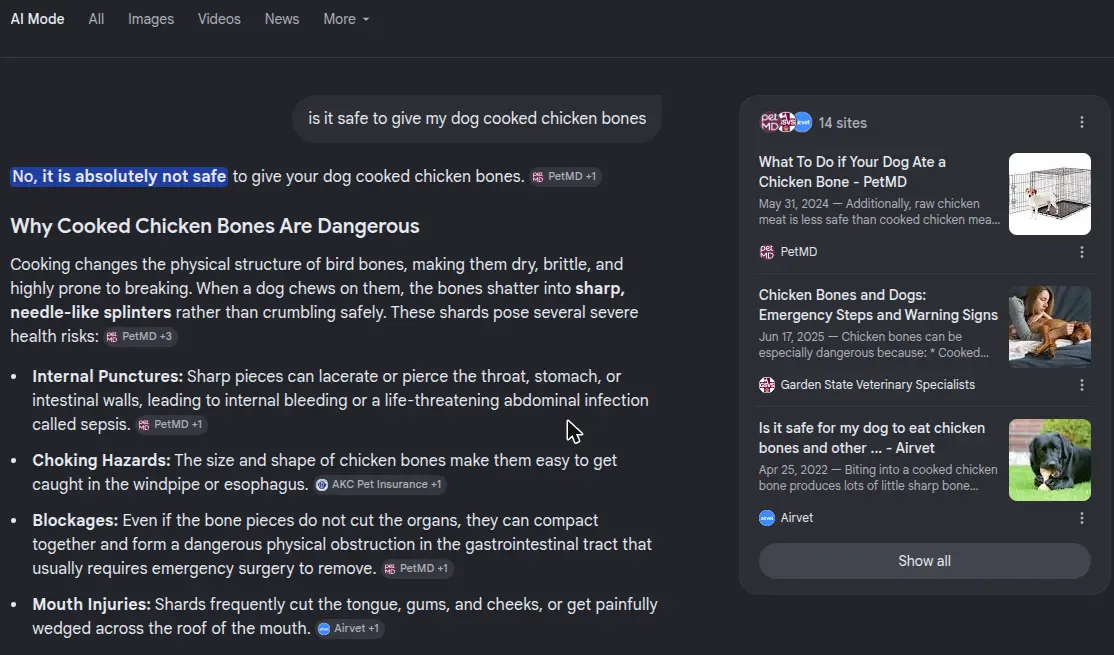
Google AI Mode with its source list on the right — our own screenshot, 31 July 2026.
The AI looks at many web pages at once — things like news articles, help guides, and product pages — and tries to pull out the key points. It then writes a short answer in plain English, often with a few source links you can tap to read more.
In AI Mode (sometimes a separate tab labeled "AI"), you can also ask follow-up questions and have a real back-and-forth conversation, much like you would with ChatGPT.
What changed from the old Google
Old Google showed you a ranked list of links. You decided which to click. You read the page. You formed your own answer.
AI Mode flips that. The AI forms the answer first. You see conclusions before you see sources.
That's faster and more convenient. But it also means the answer can be wrong before you even know to doubt it.
Other things that changed:
- Results feel more conversational. You can ask things like "What's a good beginner yoga pose for lower back pain?" and get a direct, friendly answer rather than ten blue links.
- Follow-up questions work. After the first answer, you can type "What about if I have knee problems?" and Google remembers what you already asked.
- Source links are smaller. They're still there, but you have to look for them. Clicking the small citation chips reveals which sites the AI pulled from.
What to trust — and what to double-check
AI Mode is most reliable for:
- General explanations. "How does a deductible work?" or "What is sourdough starter?"
- Step-by-step how-to questions. Basic cooking, home repairs, or software instructions.
- Definitions and background information on topics that don't change often.
Be careful with:
- Prices and product details. AI answers can be out of date by months.
- Medical, legal, and financial advice. Always verify with a licensed professional or official source. AI Mode is not a doctor.
- Recent events. If something happened in the last few days, the AI may not know yet — or may mix it up with older news.
- Specific numbers. Statistics, dosages, opening hours, phone numbers — these go wrong more often than anything else.
How to read the AI answer box
When you see the AI answer box, look for these elements:
The summary text — the main answer, written in plain language. Read this, but don't stop here.
Citation chips — small labeled boxes (often numbered or with site names) that tell you where the information came from. Click them to read the original source.
"Show more" or expand links — some answers are trimmed. Expanding reveals more details and more citations.
A thumbs-down button — you can flag the answer if it looks wrong. Google uses this feedback to improve.
What to do when you're not sure
If an AI answer surprises you, contradicts what you already know, or covers something important, treat it like a headline you need to fact-check:
- Click a citation chip and read the source page yourself.
- Look at the regular search results below the AI box. Do they agree?
- For health or legal topics, go directly to a trusted organization's website — like the CDC, NHS, or a government agency.
Can you turn it off?
If you prefer the classic link list, scroll past the AI box — everything you'd normally see is still below it. There is no setting to disable AI Overviews — Google does not offer one. The most reliable workaround is the Web tab in the search results bar (you may need to click "More" to find it); selecting it shows only traditional text links with no AI summary.
What to try next
If Google AI Mode left you curious about other AI search tools, How to Use Perplexity AI walks you through a search tool built entirely around AI answers and citations. And if you want a head-to-head breakdown, AI Search vs Google compares your main options side by side.